Counter-Strike 2 cheats

Counter-Strike 2 Cheats for Steam — Compare ESP & Aim Tiers

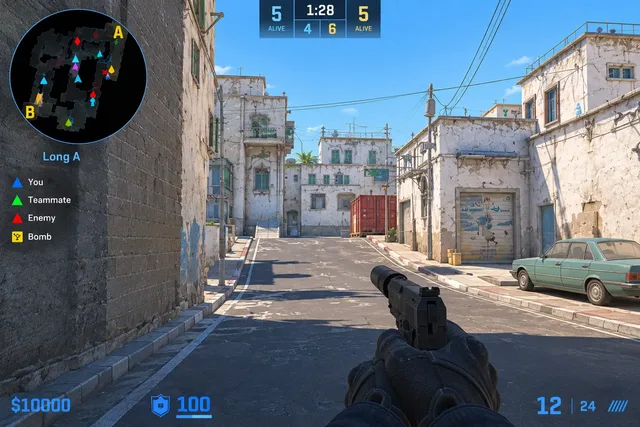
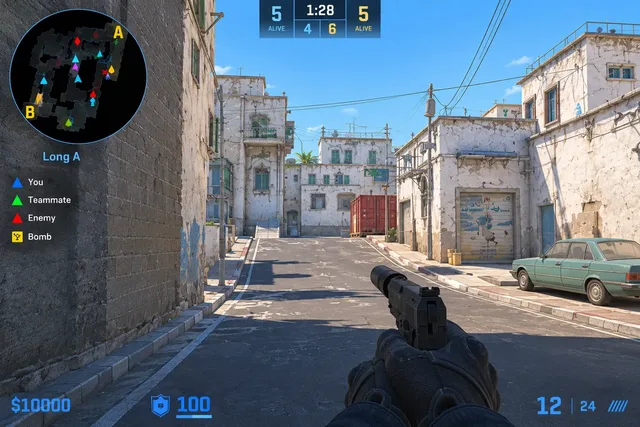
Buy Counter-Strike 2 cheat access for Steam—compare Lite ESP for info rounds, Pro for AK/M4 duels in Premier, or Elite when you want every module. Checkout unlocks your portal and loader in minutes; confirm the live status banner after Valve patches, then pick a tier and get access.

Yes

Stream-safe

<24h

Patch speed

Lite · Pro

Tiers

24/7

Discord support

ESP Active
Radar Online
Season Build
Live builds
Soft Aim Ready
No Recoil
Stream Proof
Item ESP
Skeleton ESP
UAV Radar
Map Hack
24/7 Support
Instant Delivery
Patch Ready
Trigger Bot
Bone Select
Live Status
Auto Updates
Windows 10 & 11
Steam
CS2 client
Auto updater
Config cloud sync
Discord support
HWID reset
External loader

Features

Modules that match CS2 mechanics

Modules map to how CS2 actually plays—trade timing on Mirage, A-site retakes, AWP angle holds—not a single “all-in-one” toggle. Pick a tier, then tune in the portal.

Aimbot / Soft Aim

Win Fights. Look Human.

Aimbot and Soft Aim with bone select, smoothing and FOV limits—tuned for rifles, SMGs and AWP on Premier and Competitive servers.

  • Aimbot with smoothing and FOV circle limits
  • Soft Aim that pulls the crosshair without hard snaps
  • Bone select: head, chest or nearest bone
  • Weapon profiles for AK, M4A1-S, MP5 and AWP
  • Humanized delay sliders and visibility checks
Player ESP

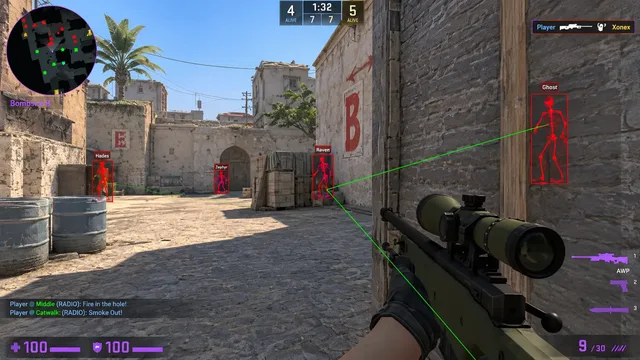
See Every Threat.

Readable player ESP that stays clean in ranked rounds, bomb-site fights and crowded roams.

  • Boxes, skeletons, names and distance
  • Health, weapon and dormant indicators
  • Team and clan color filters

Dropped weapon & utility ESP

Win the economy round.

Tag rifles, AWPs, defuse kits, and grenades left after trades—so you know whether to save, force, or pick up a dropped AK before the next execute.

  • Dropped AK-47, M4, AWP and pistol markers
  • Defuse kit and bomb / C4 carrier hints
  • HE, flash, smoke, and molotov on the floor

No Recoil / Spread

Hold the Spray.

Recoil and spread control with per-weapon profiles—start conservative and tighten as you get comfortable.

  • Per-weapon recoil compensation
  • Spread reduction sliders
  • Attachment-aware profiles in the portal

Utility Suite

Extra Tools for Clutch Moments.

Radar, Skin Changer and quality-of-life tools beyond raw ESP and aim assist.

  • Radar: Mini-map overlay for players and loot
  • Skin Changer: Preview skins locally on your client
  • Trigger Bot: Fire when the crosshair lands on a target
  • Stream Proof: Hide overlays from OBS capture

Trigger assist & clutch utilities

Post-plant and retake helpers.

Trigger assist with humanized delay for hold angles, plus overlays that highlight bomb timers and rotate timing—tuned for 1vX after plants on Inferno or Mirage.

  • Trigger assist with delay and visibility checks
  • Bomb-site timer and planter callout overlays
  • Stop-on-target when ESP picks up a swing
  • Separate presets for T/CT half swaps (MR12)

Stream Proof

Creators Stay Safe.

Keep overlays on your monitor while capture software records a clean game feed.

  • OBS and Game Bar safe modes
  • Toggle stream proof per module
  • Test checklist in portal docs

FOV Hack

See More of the Fight.

Widen your field of view for better awareness in close quarters and open-field fights.

  • Adjustable FOV range
  • Quick reset to default FOV
  • Pairs with Player ESP and radar

Cloud Config & Updates

Wipe Day Ready.

Same presets on every PC—portal updates track CS2 patches, forced restarts and VAC patch days.

  • Cloud backup for slider profiles
  • Loader push within hours of patches
  • Discord #status for build notes

Products

Counter-Strike 2 Products — Lite, Pro, Elite & Utilities

Every listing explains which CS2 problem it solves—awareness in Competitive, cosmetics locally, hardware reset after VAC, or DMA on a two-PC bench.

Why us

Why shoppers stay after the first patch day

CS2 moves fast—Valve patches, VAC updates, and meta shifts on Premier. We focus on status transparency, conservative defaults, and tickets answered by humans who run the same loader builds.

  • Patch-day loader updates

    VAC-aware builds pushed within hours of CS2 updates—check Discord #status before you join a server.

    CS2 Cheats
    Typical provider
  • Humanized aim & delays

    Smoothing, FOV limits and conservative defaults mimic real player movement—not instant snaps that get you reported and banned.

    CS2 Cheats
    Typical provider
  • Real Discord support

    Open a ticket for loader setup, configs and HWID resets—real staff, not copy-paste FAQ replies.

    CS2 Cheats
    Typical provider
  • External loader + stream proof

    Overlay suite with OBS-safe modes—no risky DLL injection into the CS2 process like legacy providers still sell.

    CS2 Cheats
    Typical provider
  • Cloud preset sync

    Weapon, ESP and per-server profiles backup to the portal—same sliders on any PC without rebuilding from scratch.

    CS2 Cheats
    Typical provider
  • HWID reset & license moves

    HWID clears and machine transfers handled through Discord tickets—most providers lock one rig or charge for every swap.

    CS2 Cheats
    Typical provider

<24h

Patch turnaround

Average time to ship a loader build after major CS2 or VAC changes.

24/7

Discord support

Open a ticket for setup, configs and account issues.

3

Combat tiers

Lite (ESP-only), Pro (aim + recoil), and Elite (full suite)—each with its own portal presets for Premier and Competitive.

Setup guide

From checkout to your first match in just three simple steps

After checkout you get a portal login, the Windows loader, and role-specific presets (CT hold on A site, T lurk timings). Start the loader before Steam CS2 so modules attach in a predictable order.

  1. Unlock portal & download loader

  2. Launch & configure modules

  3. Verify status & join CS2

How it works

From status check to saved profile.

A straight path from purchase to a CS2 profile you can reuse every session.

4 easy steps

  1. 01

    Check VAC status

    Read the homepage status banner before you buy or launch—especially after Tuesday CS2 client updates.

  2. 02

    Choose your tier

    Pick Lite, Pro or Elite—the access level that matches how you play.

  3. 03

    Launch & configure

    Download from the portal, enable modules, and tune smoothing on a test server.

  4. 04

    Save your profile

    When settings feel right, save Premier and Competitive presets to the cloud.

Blog

CS2 Cheat Buy Guides

Guides tied to real CS2 scenarios—smoke lineups with ESP distance, AK spray control, VAC errors after patches, and when Lite beats Pro on eco rounds.

Lite, Pro or Elite—module-by-module CS2 cheat breakdown covering ESP, radar, Soft Aim & Elite tools so checkout matches your Premier role.

Practice `sv_cheats` never carry to Premier—this guide splits CS2 console tricks from Lite, Pro & Elite loaders that work on Valve matchmaking.

Still losing info rounds on CS2? Map smoke stalls and eco mistakes to Lite ESP, Pro duels or Elite—without confusing trainers with queue tools.

FAQ

Questions about this page

Short pre-purchase teasers—expand any answer or open the full FAQ for every tier, checkout, and VAC topic.